

Action Templates
Action templates are the building blocks for creating actions in Credal. Each template defines a specific type of action that agents can perform, such as updating Confluence pages, sending Slack messages, or querying databases.
Getting Started with Templates
Section titled “Getting Started with Templates”To get started with action templates:
- Use our open-source directory of action templates to help you create actions
- Think of templates as the skeleton of your action—for example, a template to update Confluence docs
- Browse the Open Source Actions documentation for the open-source templates library, or view it directly on GitHub
Note: You can create custom actions to interface with your private internal systems using the "Fetch from an API or trigger a webhook" template and pasting in an OpenAPI spec!
Admin Controls for Templates
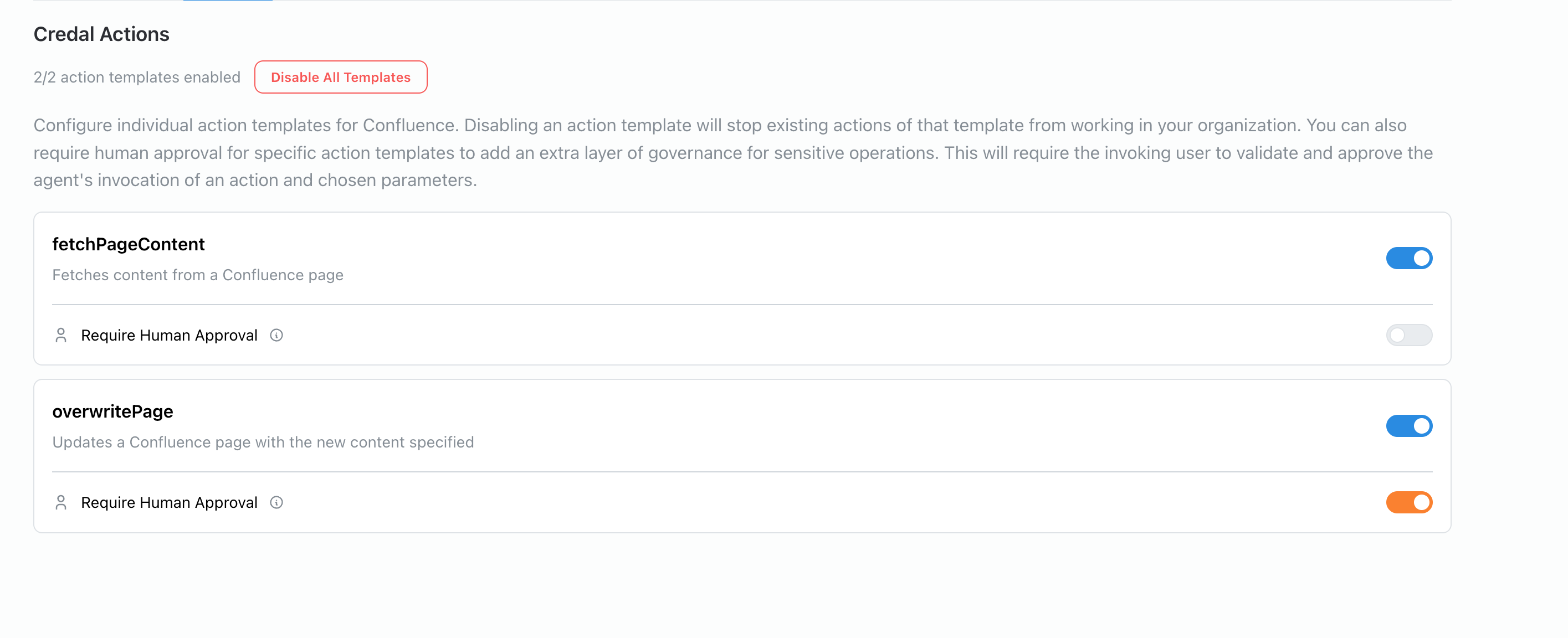
Section titled “Admin Controls for Templates”Administrators have full control over which action templates are available within their organization. Each individual template can be independently enabled or disabled, giving admins granular control over what actions agents can perform.
This capability allows organizations to:
- Restrict sensitive operations: Disable templates for actions that could have significant impact, such as deleting files or updating systems of record, until proper governance is in place
- Roll out capabilities gradually: Enable new action templates incrementally as teams become trained and comfortable with them
- Enforce compliance requirements: Only allow templates that have been reviewed and approved by security or compliance teams
- Customize by use case: Enable different sets of templates for different teams or departments based on their specific needs
To manage template availability, navigate to the System Connectors admin configuration panel where you can toggle individual templates on or off for your organization.
Human-in-the-Loop at the Template Level
Section titled “Human-in-the-Loop at the Template Level”Human approval requirements can be configured at the template level, allowing administrators to enforce human oversight for specific types of actions across the entire organization. As shown in the screenshot above, each template has a "Require Human Approval" toggle that can be enabled independently.
When human-in-the-loop (HITL) is enabled for a template:
- All actions created from that template will require human approval before execution
- Users will be prompted to review and confirm action inputs before the action proceeds
- This setting applies organization-wide, ensuring consistent governance regardless of which agent uses the action
Use Cases for Template-Level HITL
Section titled “Use Cases for Template-Level HITL”Template-level human approval is particularly valuable for:
- Financial operations: Require approval for any action that involves payments, transfers, or financial record updates
- Data modifications: Enforce review for actions that write to production databases or critical systems
- External communications: Ensure human oversight for actions that send messages to customers or external parties
- Compliance-sensitive actions: Mandate approval for any operations that could have regulatory implications
Configuring Template-Level HITL
Section titled “Configuring Template-Level HITL”Administrators can configure human approval requirements for templates in the System Connectors admin configuration panel. This organization-level setting ensures that sensitive action types always require human review, providing an additional safety layer that cannot be bypassed by individual users or agents.
For more details on human approval options and how they work, see Human Approval Options.
Next Steps
Section titled “Next Steps”Before creating your first action, learn about action parameters to understand how to configure inputs for your actions.